Wednesday, June 8, 2016

CN - Access Methods


Access Methods

 is a program or a hardware mechanism that moves data between the computer and an outlying device such as a hard disk (or other form of storage) or a display terminal.

Types of Access Methods

- Ethernet

  • CSMA/CD


Short for Carrier Sense Multiple Access / Collision Detection, a set of rules determining how network devices respond when two devices attempt to use a data channel simultaneously (called a collision). Standard Ethernet networks use CSMA/CD to physically monitor the traffic on the line at participating stations. If no transmission is taking place at the time, the particular station can transmit. If two stations attempt to transmit simultaneously, this causes a collision, which is detected by all participating stations. 


  • Switched Ethernet


An Ethernet LAN that uses switches to connect individual hosts or segments. In the case of individual hosts, the switch replaces the repeater and effectively gives the device full 10 Mbps bandwidth (or 100 Mbps for Fast Ethernet) to the rest of the network. This type of network is sometimes called a desktop switched Ethernet. In the case of segments, the hub is replaced with a switching hub.
Traditional Ethernets, in which all hosts compete for the same bandwidth, are called shared Ethernets. Switched Ethernets are becoming very popular because they are an effective and convenient way to extend the bandwidth of existing Ethernets.


  • Ethernet Frame


  • PoE (Power over Ethernet)


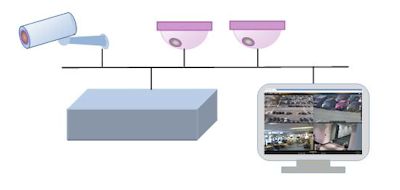
Power over Ethernet (POE) is a technology that lets network cables carry electrical power.
For example, a digital security camera normally requires two connections to be made when it is installed:

A network connection, in order to be able to communicate with video recording and display equipment
A power connection, to deliver the electrical power the camera needs to operate
Power over Ethernet brings many advantages to an installation:

  • Time and cost savings - by reducing the time and expense of having electrical power cabling installed. Network cables do not require a qualified electrician to fit them, and can be located anywhere.
  • Flexibility - without being tethered to an electrical outlet, devices such as IP cameras and wireless access points can be located wherever they are needed most, and repositioned easily if required.
  • Safety - POE delivery is intelligent, and designed to protect network equipment from overload, under-powering, or incorrect installation.
  • Reliability - POE power comes from a central and universally compatible source, rather than a collection of distributed wall adapters. It can be backed-up by an uninterruptible power supply, or controlled to easily disable or reset devices.
  • Scalability - having power available on the network means that installation and distribution of network connections is simple and effective.


- Token Ring

A Token Ring network is a local area network (LAN) in which all computers are connected in a ring or star topology and a bit- or token-passing scheme is used in order to prevent the collision of data between two computers that want to send messages at the same time.

This is how its work:

  1. Empty information frames are continuously circulated on the ring.
  2. When a computer has a message to send, it inserts a token in an empty frame (this may consist of simply changing a 0 to a 1 in the token bit part of the frame) and inserts a message and a destination identifier in the frame.
  3. The frame is then examined by each successive workstation. If the workstation sees that it is the destination for the message, it copies the message from the frame and changes the token back to 0.
  4. When the frame gets back to the originator, it sees that the token has been changed to 0 and that the message has been copied and received. It removes the message from the frame.
  5. The frame continues to circulate as an "empty" frame, ready to be taken by a workstation when it has a message to send.


- FDDI

Abbreviation of Fiber Distributed Data Interface, a set of ANSI protocols for sending digital data over fiber optic cable. FDDI networks are token-passing networks, and support data rates of up to 100 Mbps (100 million bits) per second. FDDI networks are typically used as backbones for wide-area networks.
An extension to FDDI, called FDDI-2, supports the transmission of voice and video information as well as data. 


- ATM

Asynchronous transfer mode (ATM) is a switching technique used by telecommunication networks that uses asynchronous time-division multiplexing to encode data into small, fixed-sized cells. This is different from Ethernet or Internet, which use variable packet sizes for data or frames. ATM is the core protocol used over the synchronous optical network (SONET) backbone of the integrated digital services network (ISDN).


Ref: 


Sunday, June 5, 2016

CN - HYBRID TOPOLOGIES, BACKBONE NETWORK & SWITCHING

Hybrid Topologies

Explain

- is a type of network topology that uses two or more other network topologies, including bus topology, mesh topology, ring topology, star topology, and tree topology.

Advantages & Disadvantages


Advantages of Hybrid Network Topology


1)  Reliable : Unlike other networks, fault detection and troubleshooting is easy in this type of topology. The part in which fault is detected can be isolated from the rest of network and required corrective measures can be taken, WITHOUT affecting the functioning of rest of the network. 
2) Scalable: Its easy to increase the size of network by adding new components, without disturbing existing architecture. 
3) Flexible: Hybrid Network can be designed according to the requirements of the organization and by optimizing the available resources. Special care can be given to nodes where traffic is high as well as where chances of fault are high. 
4) Effective: Hybrid topology is the combination of two or more topologies, so we can design it in such a way that strengths of constituent topologies are maximized while there weaknesses are neutralized. For example we saw Ring Topology has good data reliability (achieved by use of tokens) and Star topology has high tolerance capability (as each node is not directly connected to other but through central device), so these two can be used effectively in hybrid star-ring topology. 


Disadvantages of Hybrid Topology


1)  Complexity of Design: One of the biggest drawback of hybrid topology is its design. Its not easy to design this type of architecture and its a tough job for designers. Configuration and installation process needs to be very efficient.
2)  Costly Hub: The hubs used to connect two distinct networks, are very expensive. These hubs are different from usual hubs as they need to be intelligent enough to work with different architectures and should be function even if a part of network is down.
3)  Costly Infrastructure: As hybrid architectures are usually larger in scale, they require a lot of cables, cooling systems, sophisticate network devices, etc.


Types (Explain & Illustration)

Star Ring

 A Star ring network consists of two or more star topologies connected using a multistation access unit (MAU) as a centralized hub

. 


Star Bus 

A Star Bus (tree network) network consists of two or more star topologies connected using a bus trunk (the bus trunk serves as the network's backbone). 
File:TreeTopology.png


Snowflake

Snowflake topology is a star network of star networks


Backbone networks

Explain

A backbone is a part of computer network that interconnects various pieces of network, providing a path for the exchange of information between different LANs or subnetworks. A backbone can tie together diverse networks in the same building, in different buildings in a campus environment, or over wide areas.


Types (Explain & Illustration)

Serial Backbone

Serial backbone is formed of two or more devices that are connected in a daisy chain (linked series). It is a simplest kind of backbone. As the one can see from figure below, serial backbone can be made not only from switches, but also from gateways and routers.
Serial backbone type network


Distributed Backbone

Distributed backbone uses hierarchical design of the network, where number of intermediate devices are connected to single or multiple connectivity devices. These central connectivity devices could be switches or routers and shown with purple color in diagram below.

Simple distributed backbone type network


Collapsed backbone

This type of backbone uses single, powerful router as the central connection point for multiple subnetworks. As figure below shows, the central device is the highest level of the backbone. It should have powerful computational power in order to manage big traffic coming in. This is highly risky, since if the central device fails, the whole network would be down. However, this type of backbone is useful for the one who wants to interconnect two types of subnetworks, with ability to manage and troubleshoot them.

Parallel backbone

Parallel backbone is a variation of the collapsed backbone, where devices are having more than one connection between them. As diagram below shows, there are multiple connections between the high level routers and the network segments. Duplicate connections ensure networks availability at anytime, higher speeds, and high fault tolerance. Logical drawback of this solutions is the increased price, since amount of required cabling is highly increased. It is not obligatory to have duplicate connections between all the devices, selective implementation of parallel structure would significantly lower the overall price and make additional ports of the devices available.

Switching

Explain

The controlling or routing of signals in circuits to execute logical or arithmetic operations or to transmit data between specific points in a network. Note: Switching may be performed by electronic, optical, or electromechanical devices


Methods (Explain & Illustration)


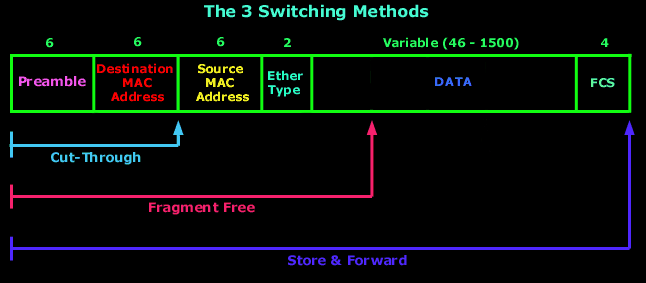
Important Switching Methods are store and forward, cut-through and fragment-free. Switching Methods determine how a switch receives, processes, and forwards a Layer 2 Ethernet frame.


In Store and Forward switching, Switch copies each complete Ethernet frame into the switch memory and computes a Cyclic Redundancy Check (CRC) for errors. If a Cyclic Redundancy Check (CRC) error is found, the Ethernet frame is dropped and if there is no Cyclic Redundancy Check (CRC) error, the switch forwards the Ethernet frame to the destination device. Store and Forward switching can cause delay in switching since Cyclic Redundancy Check (CRC) is calculated for each Ethernet frame.


In cut-through switching, the switch copies into its memory only the destination MAC address (first 6 bytes of the frame) of the frame before making a switching decision. A switch operating in cut-through switching mode reduces delay because the switch starts to forward the Ethernet frame as soon as it reads the destination MAC address and determines the outgoing switch port. Problem related with cut-through switching is that the switch may forward bad frames.


Fragment-free (runtless switching) switching is an advanced form of cut-through switching. The switches operating in cut-through switching read only up to the destination MAC address field in the Ethernet frame before making a switching decision. The switches operating in fragment-free switching read at least 64 bytes of the Ethernet frame before switching it to avoid forwarding Ethernet runt frames (Ethernet frames smaller than 64 bytes).


ref :
http://www.ianswer4u.com/2012/05/hybrid-topology-advantages-and.html#axzz4A60gIMdr
http://info-it.net/Basic-Network/hybrid-topology.php
https://en.wikipedia.org/wiki/Tree_network
https://en.wikipedia.org/wiki/Network_topology#Hybrid
http://media.gettyimages.com/photos/data-networking-picture-id182160514
https://en.wikipedia.org/wiki/Backbone_network
http://fiberbit.com.tw/types-of-backbone-networks/
http://www.its.bldrdoc.gov/fs-1037/dir-035/_5214.htm

Tuesday, May 31, 2016

WDP - Database Queries

SELECT

The SELECT statement is used to select data from a database.

SYNTAX

SELECT column_name,column_name
FROM table_name;

        and

SELECT * FROM table_name;

SAMPLE CODE

CustomerIDCustomerNameContactNameAddressCityPostalCodeCountry
1Alfreds FutterkisteMaria AndersObere Str. 57Berlin12209Germany
2Ana Trujillo Emparedados y heladosAna TrujilloAvda. de la Constitución 2222México D.F.05021Mexico
SELECT CustomerName, City FROM Customers;


Output:
CustomerNameCity
Alfreds FutterkisteHamburg
Ana Trujillo Emparedados y heladosMéxico D.F.


JOIN


SQL joins are used to combine rows from two or more tables.


SYNTAX

INNER JOIN table_name

SAMPLE CODE

Customer Table
CustomerIDCustomerNameContactNameAddressCityPostalCodeCountry
1Alfreds FutterkisteMaria AndersObere Str. 57Berlin12209Germany
2Ana Trujillo Emparedados y heladosAna TrujilloAvda. de la Constitución 2222México D.F.05021Mexico


Order Table
OrderIDCustomerIDEmployeeIDOrderDateShipperID
10308271996-09-183
103093731996-09-191

SELECT Orders.OrderID, Customers.CustomerName, Orders.OrderDate
FROM Orders
INNER JOIN Customers
ON Orders.CustomerID=Customers.CustomerID


Output:

CustomerNameOrderID
Ana Trujillo Emparedados y helados10308
Antonio Moreno Taquería10365


INSERT

The INSERT INTO statement is used to insert new records in a table.


SYNTAX
INSERT INTO table_name
VALUES (value1,value2,value3,...);   AND

INSERT INTO table_name (column1,column2,column3,...)
VALUES (value1,value2,value3,...);


SAMPLE CODE

CustomerIDCustomerNameContactNameAddressCityPostalCodeCountry
87Wartian HerkkuPirkko KoskitaloTorikatu 38Oulu90110Finland
88Wellington ImportadoraPaula ParenteRua do Mercado, 12Resende08737-363Brazil

SELECT Orders.OrderID, Customers.CustomerName, Orders.OrderDate

FROM Orders

INNER JOIN Customers

ON Orders.CustomerID=Customers.CustomerID;


Output:
OrderIDCustomerNameOrderDate
10248Wilman Kala1996-07-04
10249Tradição Hipermercados1996-07-05


UPDATE

The UPDATE statement is used to update records in a table


SYNTAX

UPDATE table_name
SET column1=value1,column2=value2,...
WHERE some_column=some_value;


SAMPLE CODE

CustomerIDCustomerNameContactNameAddressCityPostalCodeCountry
1Alfreds FutterkisteMaria AndersObere Str. 57Berlin12209Germany
2Ana Trujillo Emparedados y heladosAna TrujilloAvda. de la Constitución 2222México D.F.05021Mexico


UPDATE Customers

SET ContactName='Alfred Schmidt', City='Hamburg'

WHERE CustomerName='Alfreds Futterkiste';


Output:
CustomerIDCustomerNameContactNameAddressCityPostalCodeCountry
1Alfreds FutterkisteAlfred SchmidtObere Str. 57Hamburg12209Germany
2Ana Trujillo Emparedados y heladosAna TrujilloAvda. de la Constitución 2222México D.F.05021Mexico


DELETE

The DELETE statement is used to delete records in a table.


SYNTAX

DELETE FROM table_name
WHERE some_column=some_value;


SAMPLE CODE

CustomerIDCustomerNameContactNameAddressCityPostalCodeCountry
1Alfreds FutterkisteMaria AndersObere Str. 57Berlin12209Germany
2Ana Trujillo Emparedados y heladosAna TrujilloAvda. de la Constitución 2222México D.F.05021Mexico
DELETE FROM Customers
WHERE CustomerName='Alfreds Futterkiste' AND ContactName='Maria Anders';

Output:

CustomerIDCustomerNameContactNameAddressCityPostalCodeCountry
2Ana Trujillo Emparedados y heladosAna TrujilloAvda. de la Constitución 2222México D.F.05021Mexico
3Antonio Moreno TaqueríaAntonio MorenoMataderos 2312México D.F.05023Mexico


DROP

Indexes, tables, and databases can easily be deleted/removed with the DROP statement.


SYNTAX

DROP TABLE table_name

and

DROP INDEX table_name.index_name


CREATE TABLE

The CREATE TABLE statement is used to create a table in a database.


SYNTAX
CREATE TABLE table_name
(
column_name1 data_type(size),
column_name2 data_type(size),
column_name3 data_type(size),
....
);


SAMPLE CODE
CREATE TABLE Persons
(
PersonID int,
LastName varchar(255),
FirstName varchar(255),
Address varchar(255),
City varchar(255)
);


Output:
PersonIDLastNameFirstNameAddressCity


Ref: